door TESLA MODEL X 2016 User Guide
[x] Cancel search | Manufacturer: TESLA, Model Year: 2016, Model line: MODEL X, Model: TESLA MODEL X 2016Pages: 179, PDF Size: 4.3 MB
Page 38 of 179

automatically changes to display navigation
instructions (if applicable), or to let you know
if a door or trunk is open when Model X is in a driving gear.
Using Right Steering Wheel Buttons Use the buttons on the right side of thesteering wheel to access call options while on
a phone call, to browse the phonebook of a
Bluetooth-connected phone, to choose what
displays on the right side of the instrument
panel, to adjust Model X features, and to use
voice commands.
Note: Whenever you receive or make a phone call, the right side of the instrument panelautomatically displays call options to help you
easily handle phone calls on your Bluetooth-
connected phone.
1. Touch to browse the phonebook of a
Bluetooth-connected phone and touch
again to close it.
Press and hold to use voice commands to
navigate to a destination. When you hear
the tone, speak your command. Release
the button when you
finish speaking. For
details, see Using Voice Commands on
page 39.
2. Scroll Wheel
Page 41 of 179

StartingWhen you open a door, Model X powers on
the instrument panel and touchscreen. The
center circle on the instrument panel displays the status of doors and the charge level, and
you can operate all controls.
To drive:
Page 45 of 179

IndicatorDescriptionTire pressure warning. The pressure of a tire is out of range. If a fault with the
Tire Pressure Monitoring System (TPMS) is detected, the indicator flashes.For a TPMS fault, contact Tesla. See Tire Care and Maintenance on page 133.A door or trunk is open. See Front doors.A seat belt for an occupied seat is not fastened. See Seat Belts on page 21.The front passenger
Page 48 of 179

Controlling LightsTouch Controls on the bottom corner of the touchscreen to control most of the lights.In addition to the lights that you can control from the touchscreen, Model X has convenience
lights that turn on and
off automatically based on what you are doing. For example, you will
notice interior lights, marker lights, tail lights, door handle lights, and puddle lights that turn on
when you unlock Model X, when you open a door, and when you shift into Park. They turn
offautomatically after a minute or two or when you shift into a driving gear or lock Model X.
Lights
48Model X Owner
Page 49 of 179
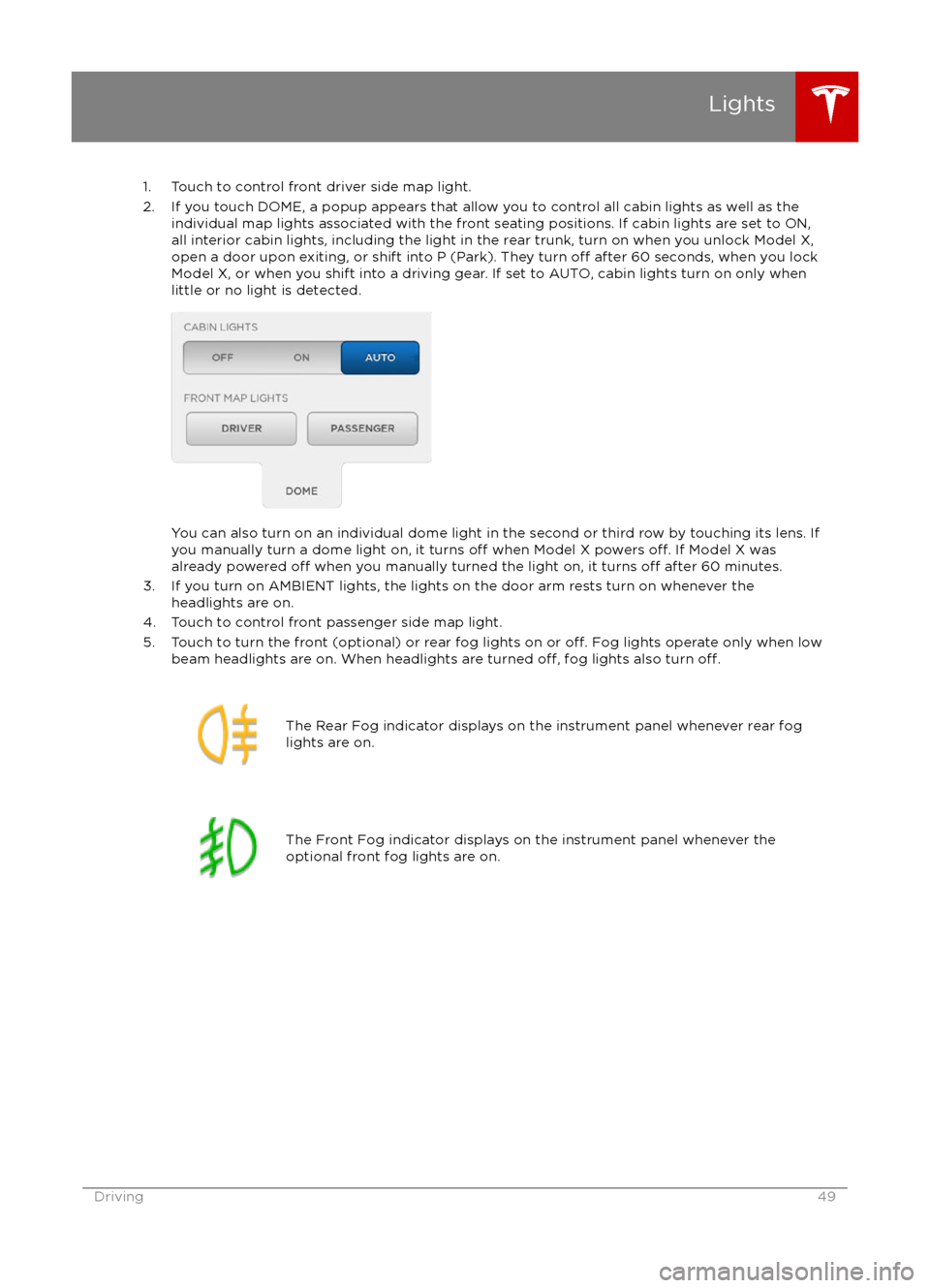
1. Touch to control front driver side map light.
2. If you touch DOME, a popup appears that allow you to control all cabin lights as well as the individual map lights associated with the front seating positions. If cabin lights are set to ON,all interior cabin lights, including the light in the rear trunk, turn on when you unlock Model X,open a door upon exiting, or shift into P (Park). They turn
off after 60 seconds, when you lock
Model X, or when you shift into a driving gear. If set to AUTO, cabin lights turn on only when
little or no light is detected.
You can also turn on an individual dome light in the second or third row by touching its lens. If
you manually turn a dome light on, it turns off when Model X powers off. If Model X was
already powered off when you manually turned the light on, it turns off after 60 minutes.
3. If you turn on AMBIENT lights, the lights on the door arm rests turn on whenever the headlights are on.
4. Touch to control front passenger side map light.
5. Touch to turn the front (optional) or rear fog lights on or
off. Fog lights operate only when low
beam headlights are on. When headlights are turned off, fog lights also turn off.
The Rear Fog indicator displays on the instrument panel whenever rear fog
lights are on.The Front Fog indicator displays on the instrument panel whenever the
optional front fog lights are on.Lights
Driving49
Page 96 of 179

3. Main viewing areaThe main viewing area changes depending on the app you have chosen (in the example, the
Nav and Media apps are displayed). For some apps (such as Nav and Web), you can zoom in and out using standard touchscreen
finger gestures.
4. Maximize/minimize app
Touch the small rectangle to expand the associated app to
fill the entire main viewing area
(some apps are not expandable). Touch again to display two apps in half-screen view.
5. Volume control
Touch the up and down arrows to increase or decrease the volume of the speakers. You can
also adjust the volume using the scroll wheel on the left side of the steering wheel.
6. Climate controls (see Climate Controls on page 105).
7. Controls
Touch to access all Model X controls and settings (doors, locks, lights, etc).
8. Reverse the position of the two currently displayed apps.
Warning: Paying attention to road and traffic conditions must always be the driver
Page 98 of 179

1. CloseTouch the circled X in the top left corner of a window to close it (or you can touch anywhere
outside the window).
2. Doors
Touch to open or close front doors or falcon wing doors.
3. Suspension
If Model X is equipped with Smart Air Suspension, touch to manually raise or lower Model X,or to remove a previously saved auto-raising location (see Smart Air Suspension on page
110). Model X must be powered on and you must press the brake pedal before you can
change suspension settings. Smart Air Suspension causes Model X to self-level, even when powered
off. Therefore, when towing or lifting, you must disable self-leveling (see Instructions
for Transporters on page 164 and Jacking and Lifting on page 149).
Controls
98Model X Owner
Page 121 of 179

About the Security System
If Model X does not detect a key nearby and a
locked door or trunk is opened, an alarm sounds and headlights and turn signals
flash.To deactivate the alarm, press any button on the key.
To manually enable or disable the alarm system, touch Controls > Settings > Safety &
Security > Alarm. When set to on, Model X activates its alarm one minute after the doors
lock and a recognized key is no longer
detected nearby.
Security Settings
Using the Touchscreen121
Page 128 of 179
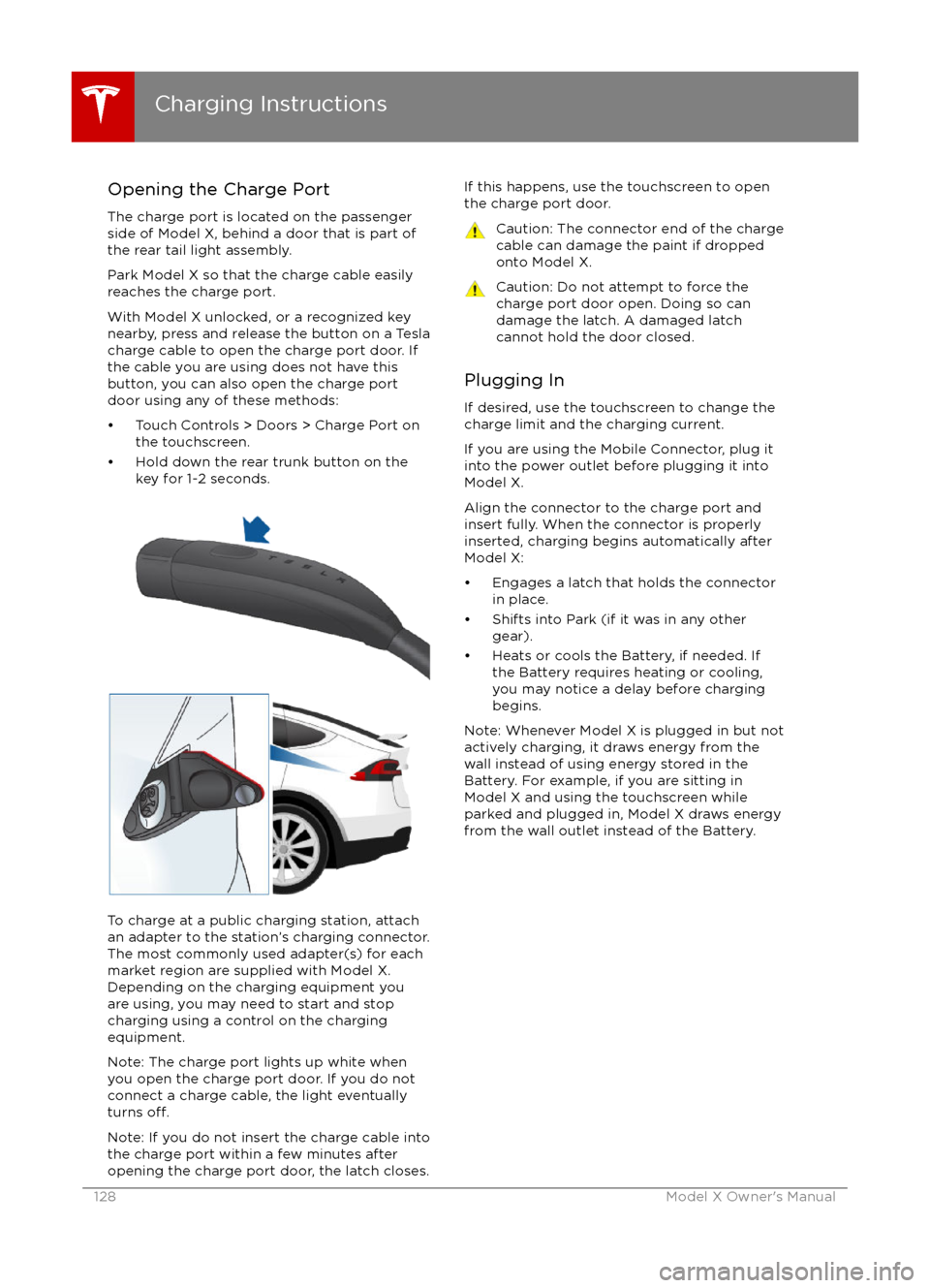
Opening the Charge PortThe charge port is located on the passenger
side of Model X, behind a door that is part of
the rear tail light assembly.
Park Model X so that the charge cable easily
reaches the charge port.
With Model X unlocked, or a recognized key
nearby, press and release the button on a Tesla
charge cable to open the charge port door. If the cable you are using does not have this
button, you can also open the charge port door using any of these methods:
Page 130 of 179

Changing Charge SettingsThe charge settings screen displays on the
touchscreen whenever the charge port door is
open.
To display charge settings at any time, touch the Battery icon on the top of the
touchscreen, or touch Controls > Charging
(located in the upper right portion of the
Controls screen).
Note: The following illustration is provided for
demonstration purposes only and may vary
slightly depending on the software version
and market region of your Model X.
1. Charge status messages (such as
Charging Scheduled, Charging In
Progress) display here.
2. To adjust the charge limit, touch Set Charge Limit, then drag the slider bar. You
can charge to any level from 50% to 100%
based on your driving needs. The setting
you choose applies to both immediate and scheduled charging sessions.
3.Location-specific schedule. With Model X
in Park, set a specific time when you want
Model X to begin charging at the current
location. If, at the scheduled time, Model X
is not plugged in at the location, it will
start charging as soon as you plug it in as
long as you are plugging it in within six
hours of the scheduled time. If you plug in
after six hours, Model X does not start
charging until the scheduled time on the
next day. To override this setting, touch Start Charging or Stop Charging (see
item 4). When you set a scheduled
charging time, Model X displays the set
time on the instrument panel and the
touchscreen.
4. Touch to open the charge port door or to start (or stop) charging.
5. The current automatically sets to the maximum current available from the
attached charge cable, unless it was
previously reduced to a lower level.
If needed, touch the up/down arrows to change the current (for example, you may
want to reduce the current if you are
concerned about overloading a domestic wiring circuit shared by other equipment).
It is not possible to set the charging
current to a level that exceeds the
maximum available from the attached
charge cable.
When you change the current, Model X
remembers the location. So if you
subsequently charge at the same location,
you do not need to change it again.
Note: If Model X automatically reduced a charging location